Contents

On this page

  1. Install Tillage in Claude
  2. What Tillage helps with
  3. The map in three words
  4. The other cards on the map
  5. Your first session
  6. Next steps
    1. Opening tomorrow's session
    2. Recording a rule or a decision
    3. Keeping what your agent proposed
    4. Working on a branch and merging
    5. Changing course
    6. Tracing a bug
    7. Pipelines and internal tools
    8. Warnings on the project card
  7. What runs on your machine
  8. Important notes

Guide

Tillage guide

Tillage gives your coding agents a map of your project: who it is for, how it is built, and the rules that apply where they are working. This guide installs it, walks you through your first session, and covers what comes next.

New to Tillage? Start with What Tillage helps with.

Written for Tillage 0.16.0

01

Install Tillage in Claude

Tillage is free for individuals. It is readable code, published under the Functional Source License. Anyone can install it; there is no invitation step. A company that wants team seats can ask us.

  1. Before you start

    Node.js 22.12.0 or newer on your PATH. Check with node --version; if it is missing or older, install the current LTS from nodejs.org. Claude Code's own native install needs no Node, so having Claude Code does not mean having it.

    Claude Code 2.1.287 or newer. Check with claude --version.

  2. In the Claude Code terminal

    > /plugin marketplace add Reine0017/tillage
    > /plugin install tillage@tillage
  3. Or from any shell

    $ claude plugin marketplace add Reine0017/tillage
    $ claude plugin install tillage@tillage
  4. In the Claude desktop app

    The Code tab's local and SSH sessions already have an install made by step 2 or 3, because plugins are installed for your user on this machine (~/.claude). To install from the app instead:

    1. Add the marketplace from a terminal first (the first line of step 2 or 3). The app's plugin browser lists the plugins of marketplaces already added, and Claude Code's documentation gives no way to add one inside the app (checked 2026-10-13).
    2. Click + next to the prompt box, then Plugins, then Add plugin, and pick Tillage.
    3. When it asks for a scope, choose your user account.
  5. Check it worked

    Start a new session, or type /reload-plugins. Then /mcp lists tillage as connected. Go on to Your first session.

  6. Where it runs

    Sessions on your own machine: the terminal, and the desktop app's local and SSH sessions. Cloud sessions run on a remote machine and are a poor home for a map that lives in ~/.tillage.

No SSH key on GitHub?

Claude Code clones a marketplace over SSH when your SSH key works with GitHub, and over HTTPS otherwise. Installs and updates started inside a session do not fall back, so on a machine with no SSH key on GitHub, set this in the shell you start Claude Code from, then run the two commands again:

$ export CLAUDE_CODE_PLUGIN_PREFER_HTTPS=1

Or put it under "env" in ~/.claude/settings.json, so every session has it:

{ "env": { "CLAUDE_CODE_PLUGIN_PREFER_HTTPS": "1" } }

02

What Tillage helps with

Six situations you have probably met, strongest first. For each: what you would do today, what Tillage adds, and where it stops.

1

“What was my agent actually told?”

Today
Claude Code's /context shows which CLAUDE.md and memory files a session loaded, but every agent gets each file whole, and nested CLAUDE.md files are scoped by folder, not by the piece of work. Once the session ends, nothing records what the agent had when it did a given task.
Tillage
A rule sits on the card it governs, so an agent working on checkout is not handed the payouts rules. Every card has a “context served here” view listing exactly what an agent working there receives, and which card each entry comes from.
Worth knowing
Entries you have not kept still reach agents, marked unreviewed.
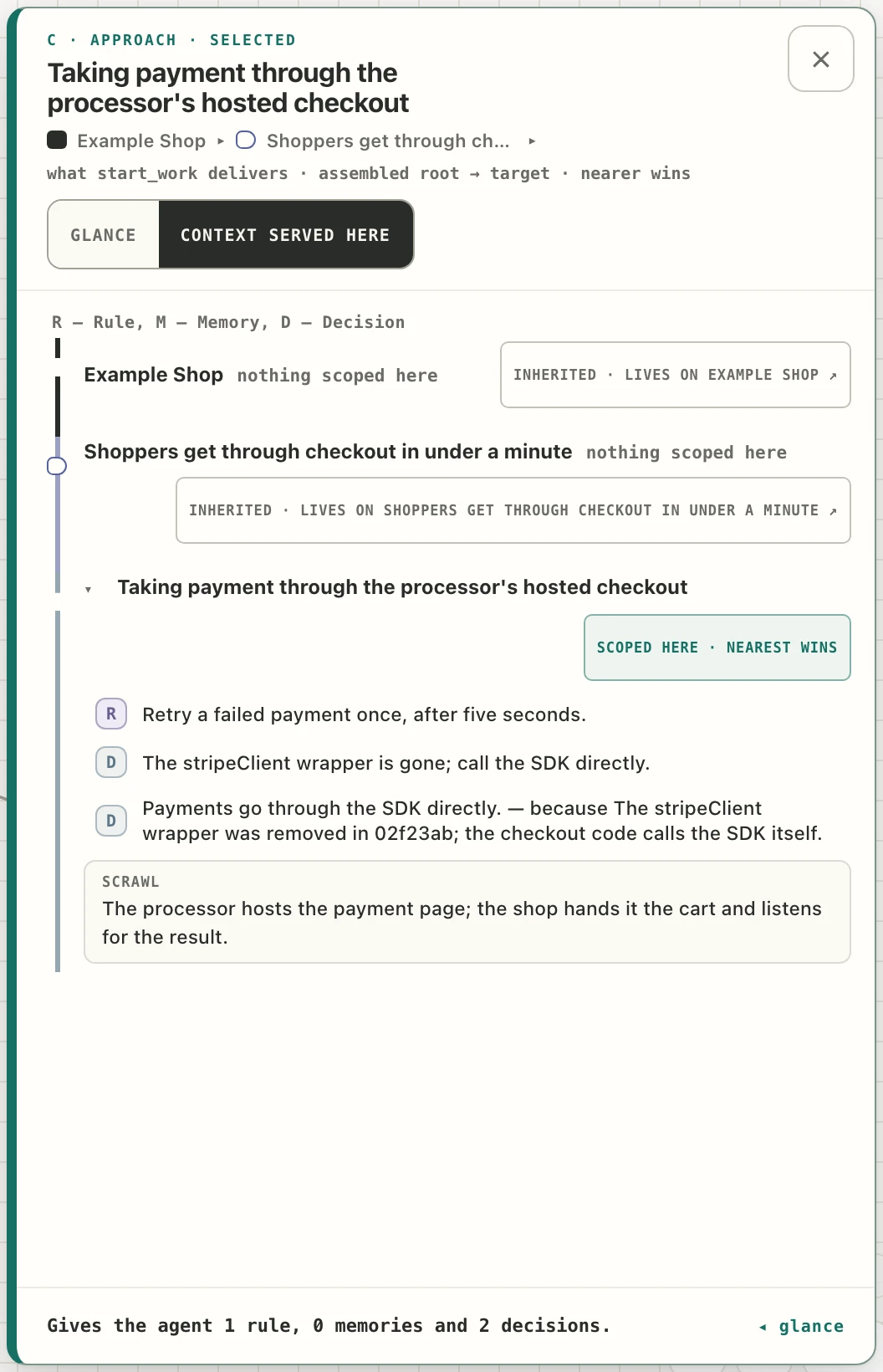
An approach's panel on its “context served here” view, listing the rule and two decisions an agent working there receives, each under the card it comes from.
An approach's panel on “context served here”: what an agent working there is given, and from which card.

2

“Which task wrote this code, and under what rules?”

Today
You or your agent follow git blame to a commit, its pull request, maybe an issue. None of them records what the agent was told at the time.
Tillage
Tasks carry their commits. Ask your agent to trace a bug and it goes from the commit to the task, its slice and its proposition, and to the rules and decisions the task was done under. That record of what the agent was handed when it started the task is the task's receipt.
Not yet
No screen answers “why does this file exist”. After a squash merge, a commit on main no longer leads back to its task (how each kind of merge behaves). A slice's files are whatever the agent recorded.
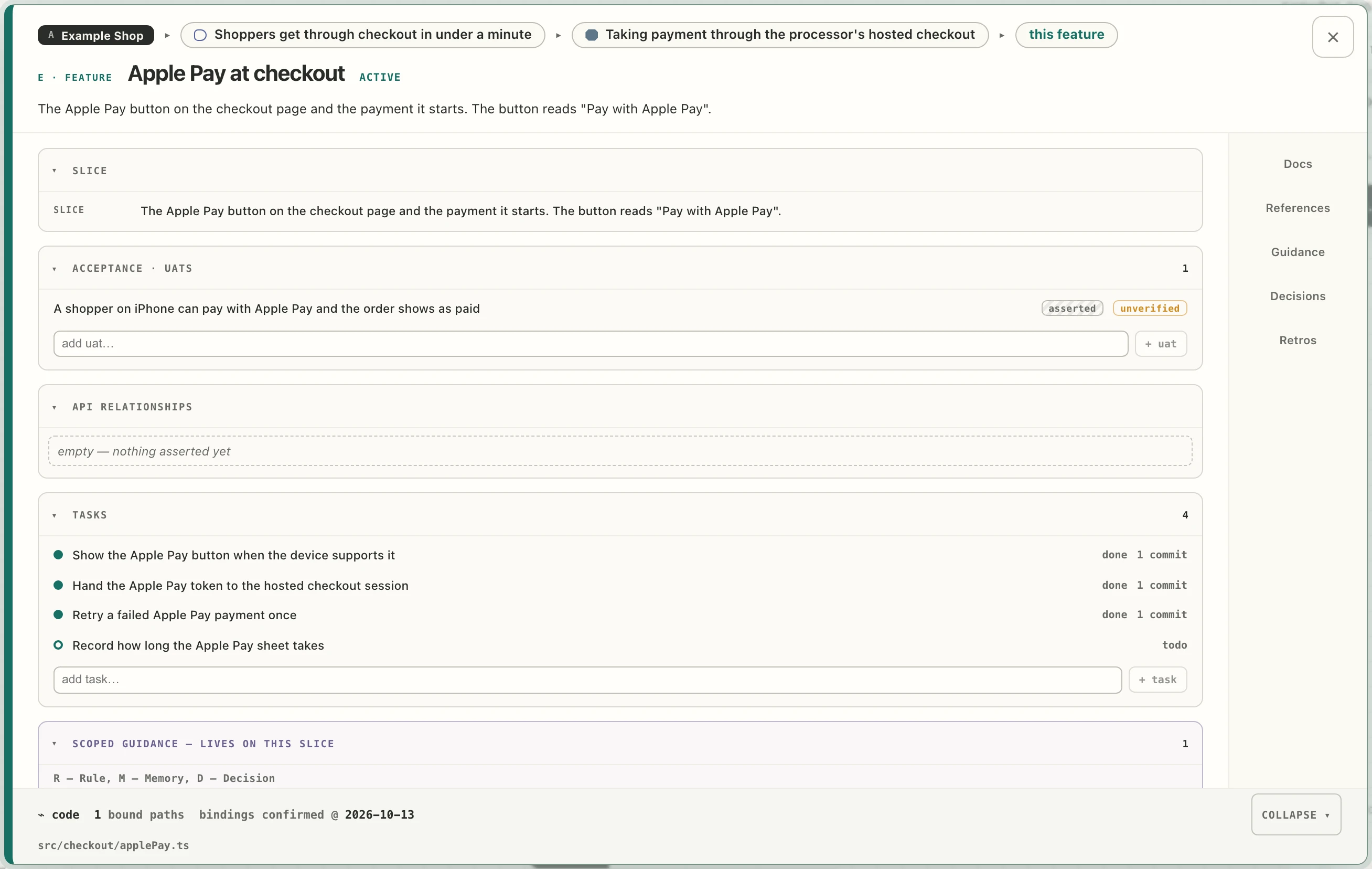
A slice's full panel for “Apple Pay at checkout”: its acceptance criterion, four tasks of which three read “done · 1 commit”, and the “⌁ code” strip naming src/checkout/applePay.ts.
The slice's full panel: each finished task with its commit, and the “⌁ code” strip with the file the slice owns.

3

“I changed my mind. What was built for the old way?”

Today
Three sizes of change: a rule; an approach (the same goal reached a different way); a proposition (the goal itself was wrong). You ask your agent what was built under the old rule, or for the old approach. It searches the code and usually finds most of it, but a search cannot do it cleanly every time:
  • nothing records what code was for, so the agent infers it from names;
  • code named differently survives the search: config, migrations, feature flags, tests, a webhook handler;
  • a search cannot tell shared code from leftover code, so risky deletions get skipped and dead code piles up;
  • some rules leave no trace in the code (“Never retry a failed payment automatically” has no pattern to search for), so the work done while they held cannot be found;
  • the old direction's rules keep steering new agents until someone notices.
Tillage
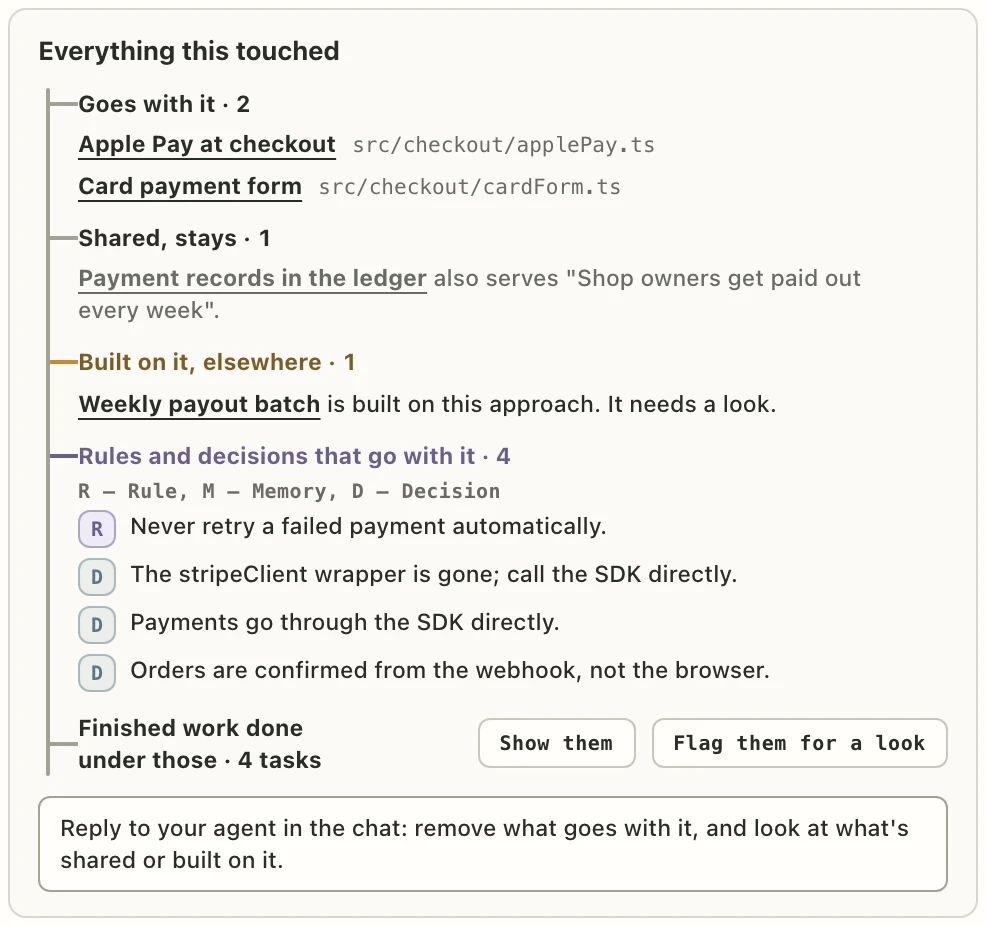
The map already knows which slices, files, rules and decisions belong to which approach and proposition. Set the old approach aside and its panel lists everything it touched: what goes with it and its files, what is shared and stays, what elsewhere is built on it, its rules and decisions, and the finished work done under them. Removing the code becomes its own slice, with a check that what should still work still works.
Not yet
The lists are only as complete as the files your agents recorded on slices, so code from before Tillage outside the area you have mapped does not show. A parked approach's rules still reach agents, marked parked, until you drop them. The map does not record who parked something.
“Everything this touched” on a parked approach: two slices that go with it, one shared slice that stays, one approach built on it, four rules and decisions, and four finished tasks with the buttons “Show them” and “Flag them for a look”.
“Everything this touched” on the parked approach.

4

“My CLAUDE.md has drifted from the code.”

Today
You audit it when you notice by chance that a line no longer matches the code, often because an agent just followed the stale line.
Tillage
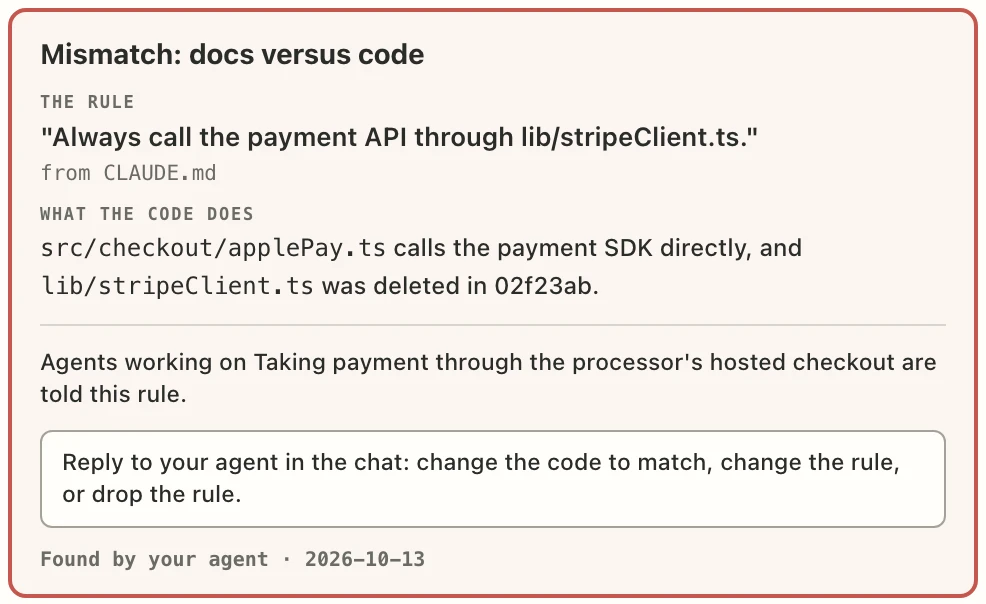
The first session checks the docs and rules where your task lives against the code; each disagreement shows as “Mismatch: docs versus code” for you to rule on. CLAUDE.md becomes a short generated pointer to the map.
Not yet
No review of rules after work; stale entries only fade on screen. Specs and plans folders are not moved onto the map.
A red box headed “Mismatch: docs versus code”: the rule “Always call the payment API through lib/stripeClient.ts.” from CLAUDE.md, what the code does instead, and the line “Reply to your agent in the chat: change the code to match, change the rule, or drop the rule.”
A mismatch in the approach's panel, found by the agent in the first session.

5

“My agent made a choice I never saw.”

Today
It is in the chat, a commit message, or a decision-record file if you asked for one. Nothing asks you to sign off before the next agent builds on it.
Tillage
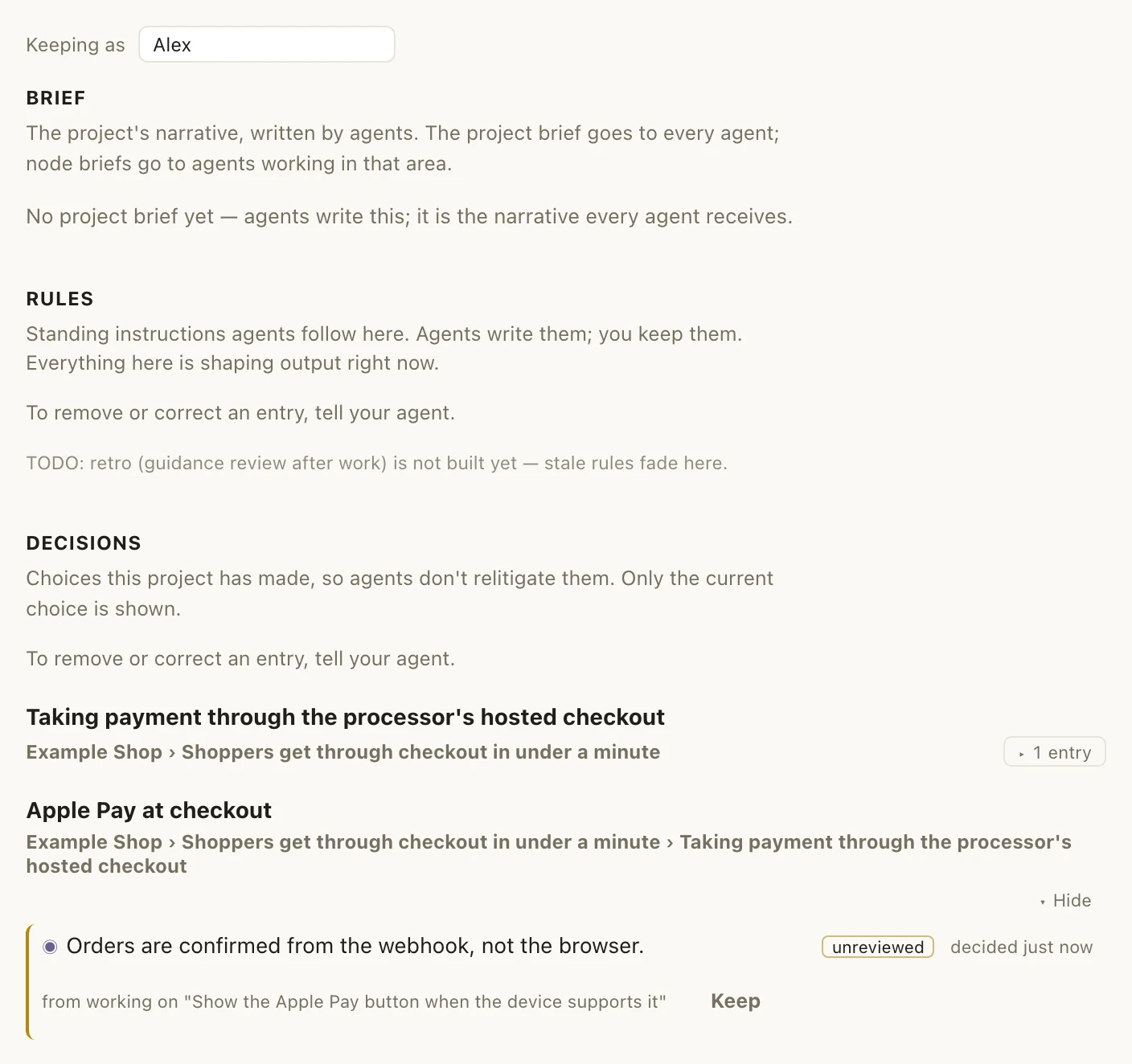
The agent records its choices as proposed decisions, with the reason and what it rejected, and you keep each one under your name.
Worth knowing
The map does not record which agent proposed a choice.
The Context page with “Keeping as Alex” at the top and, under Decisions, the entry “Orders are confirmed from the webhook, not the browser.” marked unreviewed, with its “Keep” button.
The Context page: a decision the agent proposed, marked unreviewed, waiting for “Keep”.

6

“What is this work for?”

Today
A goals paragraph in CLAUDE.md, and a ticket tracker whose tickets link to pull requests. But the agent doing the work is not told who it is for while it works.
Tillage
Every slice sits under a proposition (who it is for, and what gets better for them), and the agent is reminded of it while working. A task cannot be closed without a commit or a note.
Not yet
“Verified” is your word, not a check. The map lives on your machine and is yours alone.
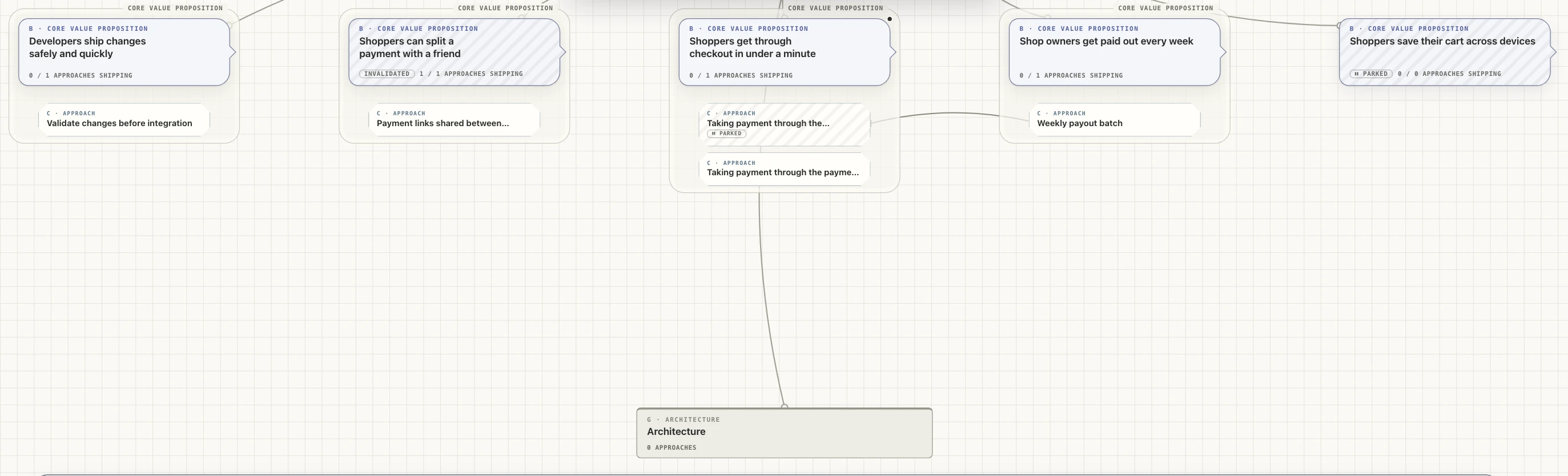
The top of the example map: five proposition cards in a row, one marked invalidated and one parked, each with its approaches under it, and the Architecture card below.
The top of the map: every proposition, with its approaches under it.

03

The map in three words

B · Core value proposition

Proposition

Something your product does for someone, and what gets better for them.

“Shoppers get through checkout in under a minute.”

C · Approach

Approach

One way the code delivers a proposition.

“Taking payment through the processor's hosted checkout.”

E · Feature

Slice

A small piece of work under an approach, with what “done” means and its tasks. A slice card shows its kind, such as “Feature” or “removal”.

“Apple Pay at checkout.”

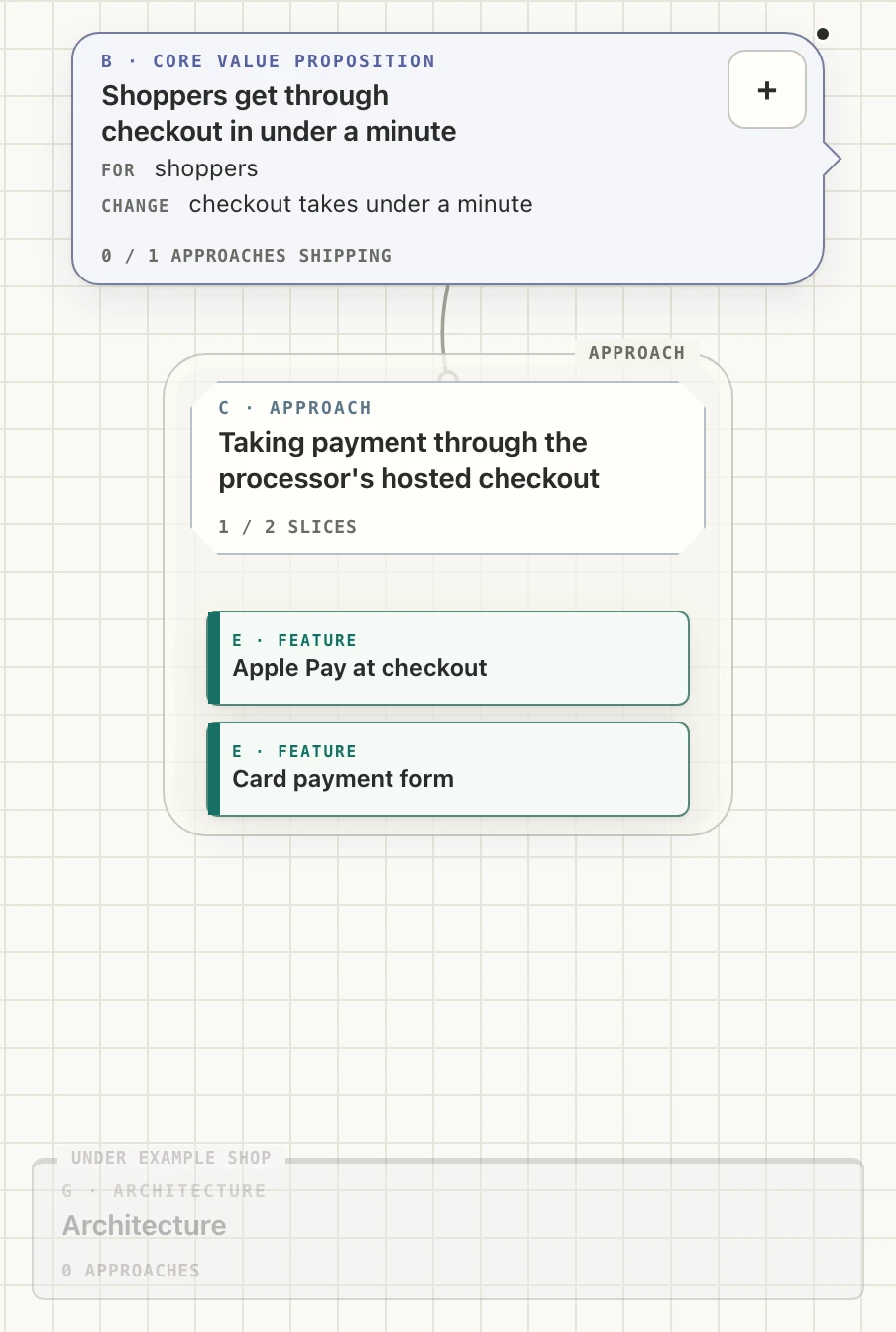
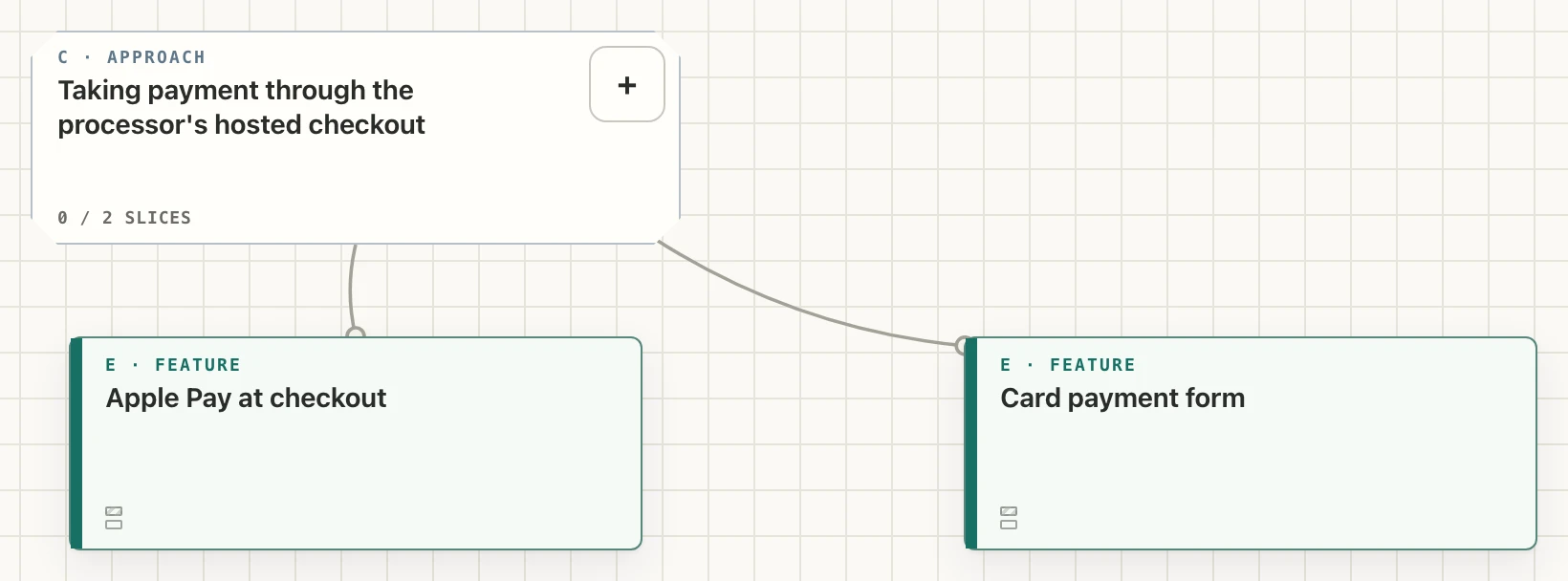
The example map at a proposition's level: the proposition “Shoppers get through checkout in under a minute” at the top, the approach “Taking payment through the processor's hosted checkout” under it with the slices “Apple Pay at checkout” and “Card payment form”, and the faded Architecture card at the bottom. proposition approach slices architecture
The example map at a proposition's level. The labels are page text laid over the image.

What sits on a card: rules R, memory M and decisions D, listed under “Scoped guidance”. An agent working on that card, or below it, is told them. Tasks are the rows of a slice's table. The Architecture card holds the approaches other things are built on; it and the other cards are in the next section.

04

The other cards on the map

Four more kinds of card complete the map. You can add any card yourself: press the C key, click the + on the card you are on, or double-click empty space on the map, then pick from the kinds that fit there. Or ask your agent.

A · Project

Project

The top card: your repository. There is one, and Tillage makes it with the map.

Do
Open its panel to see what changed since you last looked and what is waiting on you (Opening tomorrow's session), and the map's own warnings (Warnings on the project card).
See
The card counts what is on the map, such as “2 propositions · 3 approaches · 5 slices · 1 open question”.
Watch out
A rule recorded on the project card reaches every task, so keep it for what holds everywhere.
G · Architecture

Architecture

One card under the project, made with the map. It holds the approaches that other parts of the product are built on.

Do

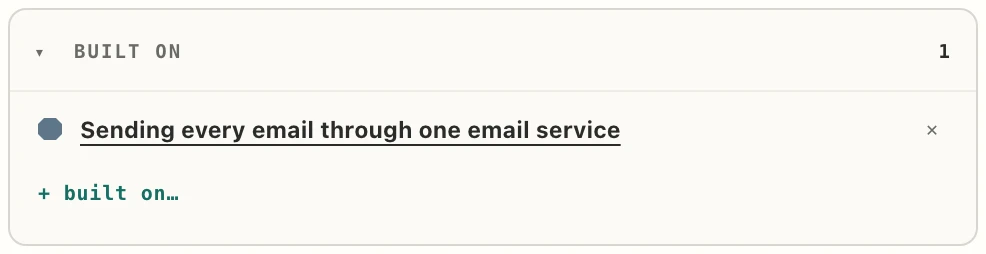
When two parts of the product rely on one piece, put that piece under Architecture as an approach, with the + in its “Approaches” section. Then each slice that uses it names it under “Built on”, with “+ built on…”.

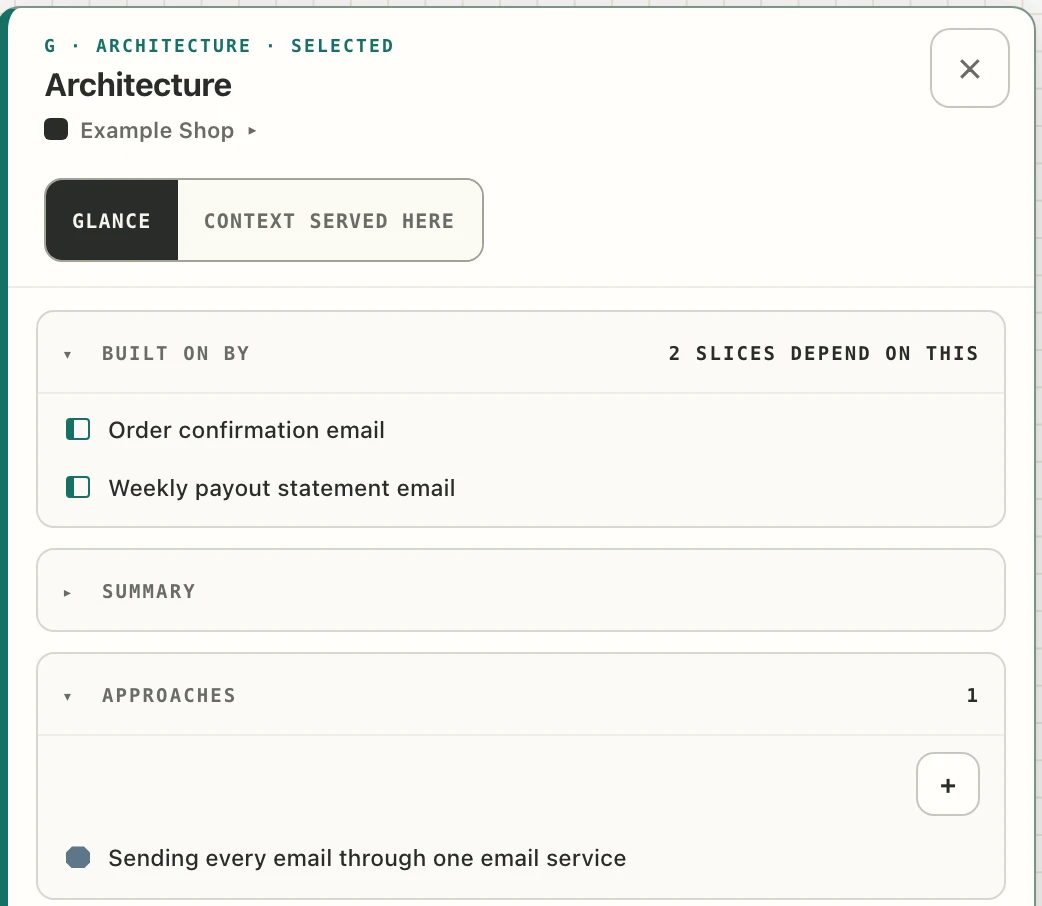
In Example Shop, order confirmations and weekly payout statements both send email, so “Sending every email through one email service” sits under Architecture and both slices are built on it.

See
The Architecture card's panel lists under “Built on by” every slice and approach that depends on it. An approach's own panel says how many are built on it, across how many propositions.
Watch out
Architecture holds approaches only. When nothing elsewhere is built on one of them, or work under several propositions is built on one approach outside it, the warnings on the project card suggest moving it. Your agent links and moves these too.
The Architecture card's panel: under “Built on by”, “2 slices depend on this”, the slices “Order confirmation email” and “Weekly payout statement email”; under “Approaches”, “Sending every email through one email service”.
The Architecture card's panel: one approach, and the two slices built on it.
The “Built on” section of the slice “Order confirmation email”: “Sending every email through one email service”, with “+ built on…” below.
The slice “Order confirmation email” names what it is built on.
D · Question

Question

Something you don't know yet, where the answer changes what you build. Its title is the question, and it sits under a proposition or an approach.

Do

When you or your agent hit an unknown, record it as a question rather than guess; a question is the first choice when you add a card wherever one fits. Name the cards its answer affects with “+ affects…”, and start an investigation under it for each way of finding out.

When you know, double-click the question to open it in place, write the final answer, and pick its conclusion: supported, rejected, inconclusive or abandoned.

See
The card reads “open” until it is concluded, and its panel counts its investigations, such as “1 / 2 concluded”. A question open for more than 30 days with no investigation under way appears under “Waiting on you”.
Watch out
The D on a question's card stands for question. The small D badge under “Scoped guidance” marks a decision.
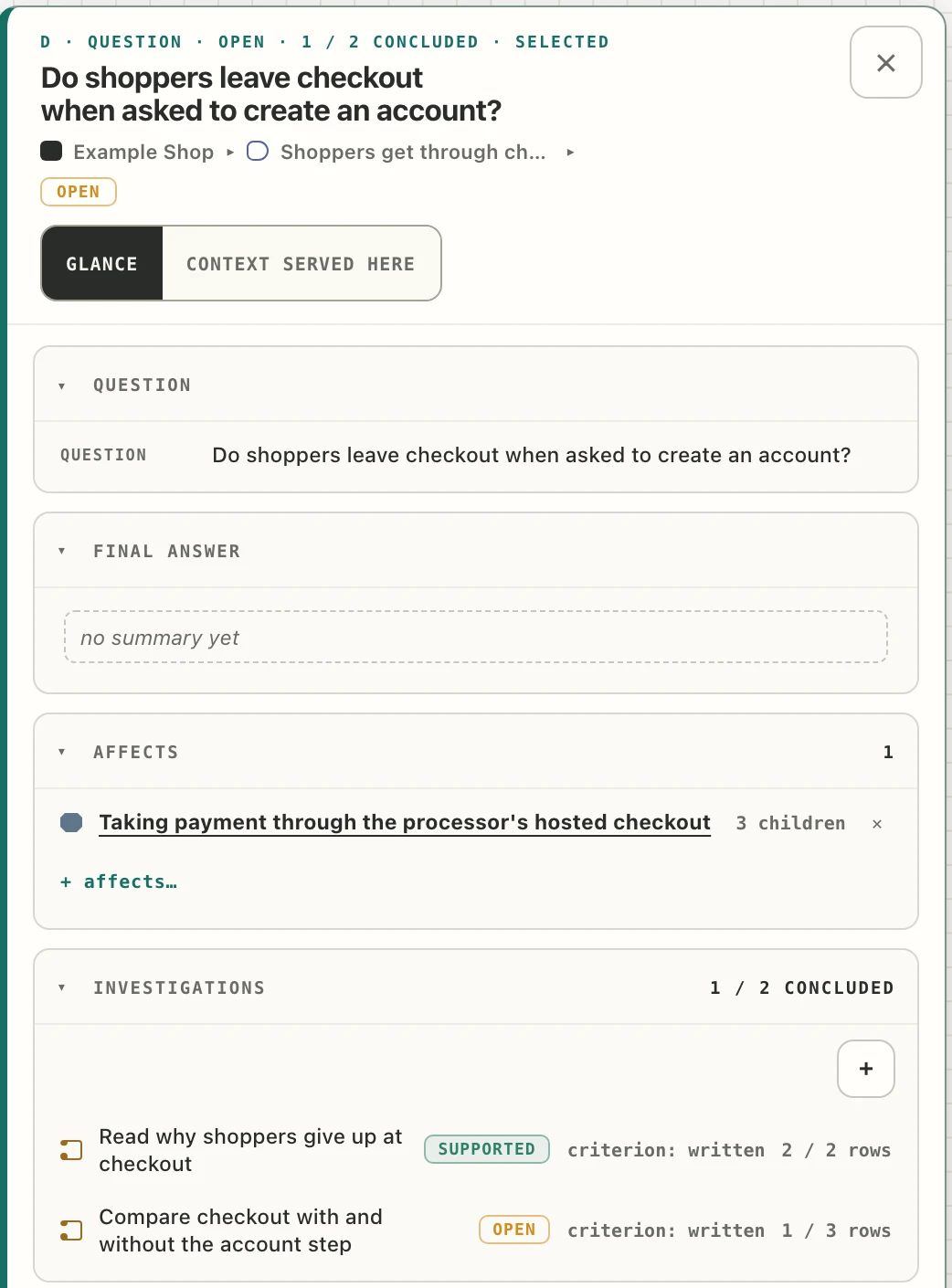
A question's panel: “Do shoppers leave checkout when asked to create an account?”, open, with no final answer yet. It affects the approach “Taking payment through the processor's hosted checkout”. Under “Investigations”, “1 / 2 concluded”: “Read why shoppers give up at checkout”, supported, and “Compare checkout with and without the account step”, open.
A question's panel: the approach its answer affects, and two investigations, one concluded.
F · Investigation

Investigation

One way of answering a question, by one method. A second method is a second investigation.

Do

Add it under the question with its method, then write what result would prove it right: “We are right if…”. Its tasks are worked like a slice's.

When the evidence is in, open its workbench (“open workbench” at the foot of its panel), write a summary of what you found, and pick its conclusion: supported, rejected, inconclusive or abandoned.

See
On the Board view each question lists its investigations, with their state and tasks done; click one to open its panel.
Watch out
Once an investigation is concluded, its “We are right if…” line can no longer change, so write it before the evidence comes in.
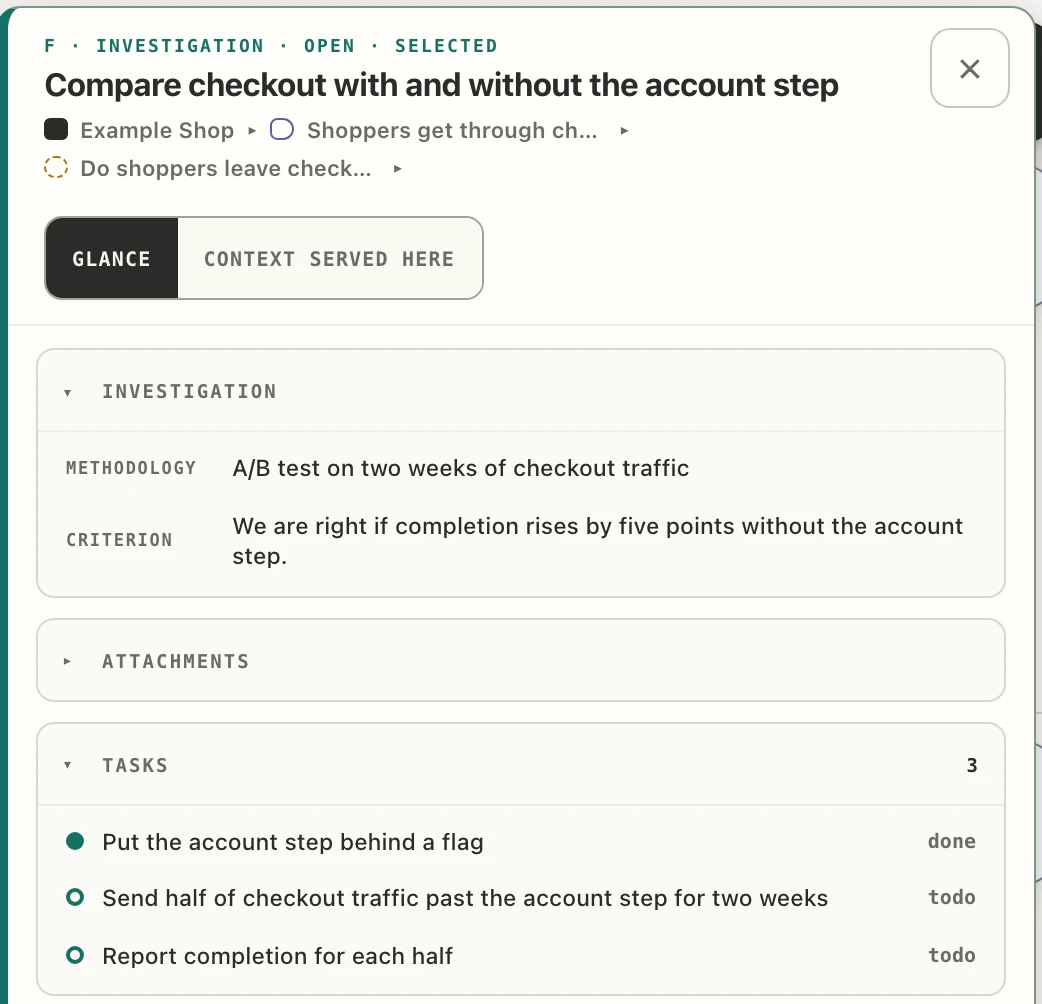
An investigation's panel: “Compare checkout with and without the account step”, open, under the question “Do shoppers leave checkout…”. Methodology: “A/B test on two weeks of checkout traffic”. Criterion: “We are right if completion rises by five points without the account step.” Tasks: “Put the account step behind a flag”, done; two more to do.
An investigation's panel: its method, its “We are right if…” line, and its tasks.

05

Your first session

Seven steps, on an example online shop. Open Claude Code in your repository and follow along with your own task.

  1. Ask for Tillage by name

    you

    /tillage:map set up this repo. I'm working on Apple Pay at checkout, due 24 Oct

    Tillage starts only when you ask for it. Add a due date if your task has one.

  2. Say who the work is for

    your agent

    Who is this work for, and what gets better for them when it ships?

    Your agent's wording will differ.

    you

    Shoppers. Checkout should take under a minute.

    your agent

    I would word it as “Shoppers get through checkout in under a minute.” Shall I place it?

    Your agent shows you its wording and asks before placing anything.

  3. The map opens

    you

    Yes.

    your agent

    Placed. I am opening your map; here is its link in case it does not open: ‹link›

    Your agent opens the map: in the desktop app's browser pane, or in your browser. In the terminal, Claude Code asks your permission first. Opening it is reliable on macOS; elsewhere your agent gives you the link.

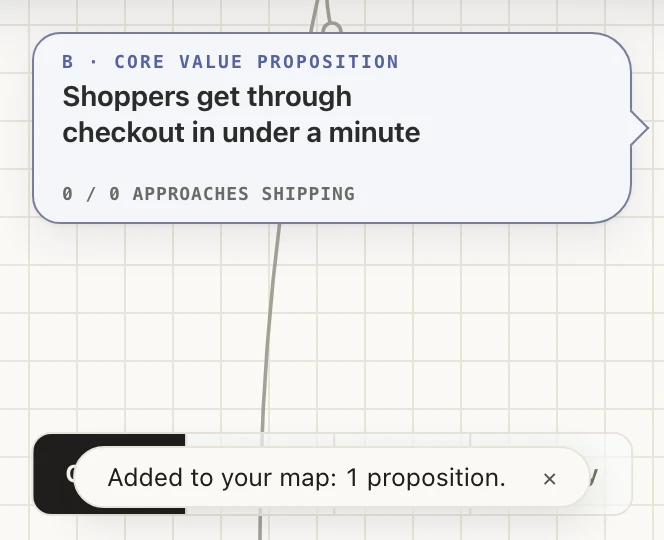
    The first proposition card on the map, “Shoppers get through checkout in under a minute”, with the notice “Added to your map: 1 proposition.” below it.
    The first proposition, and the notice “Added to your map: 1 proposition.”
  4. Map only where your task lives

    your agent

    Apple Pay lives under one approach, “Taking payment through the processor's hosted checkout”. Two slices: “Apple Pay at checkout” (src/checkout/applePay.ts) and “Card payment form” (src/checkout/cardForm.ts). Shall I place them?

    you

    Yes.

    Your agent lists the one approach your task lives in, its slices, and the files each covers. Once you say yes, they appear and the map moves in to them.

    The approach card “Taking payment through the processor's hosted checkout” with two slice cards under it, “Apple Pay at checkout” and “Card payment form”.
    The approach with its slices.
  5. Check the rules against the code

    your agent

    I checked CLAUDE.md against the code there. One rule disagrees: “Always call the payment API through lib/stripeClient.ts.” src/checkout/applePay.ts calls the payment SDK directly, and lib/stripeClient.ts was deleted in 02f23ab. Keep the rule and change the code, change the rule, or drop it?

    you

    Drop it. The wrapper is gone; call the SDK directly.

    your agent

    Dropped, and your reason is recorded as a decision.

    Your agent checks the docs and rules there against the code. A disagreement shows as “Mismatch: docs versus code”; you answer in the chat: change the code, change the rule, or drop it. If nothing disagrees, nothing appears.

    The red box “Mismatch: docs versus code” in the approach's panel: the rule from CLAUDE.md, what the code does instead, and how to reply.
    The mismatch, open in the approach's panel.
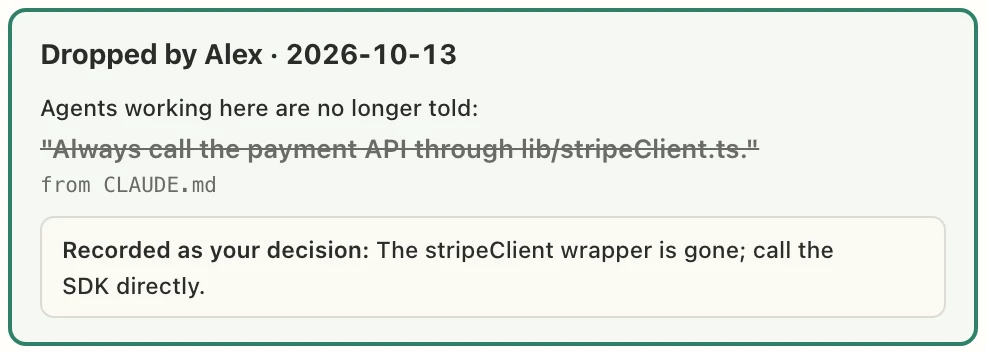
    The same box after the ruling: “Dropped by Alex · 2026-10-13”, the rule struck through, and “Recorded as your decision: The stripeClient wrapper is gone; call the SDK directly.”
    The result: the rule dropped, and the reason kept as your decision.
  6. Agree what “done” means

    your agent

    For “Apple Pay at checkout”, done when a shopper on iPhone can pay with Apple Pay and the order shows as paid. Three tasks: show the Apple Pay button when the device supports it; hand the Apple Pay token to the hosted checkout session; retry a failed Apple Pay payment once. Shall I add them and start on the first?

    you

    Yes.

    Your agent proposes what “done” means and the tasks, then starts once you agree.

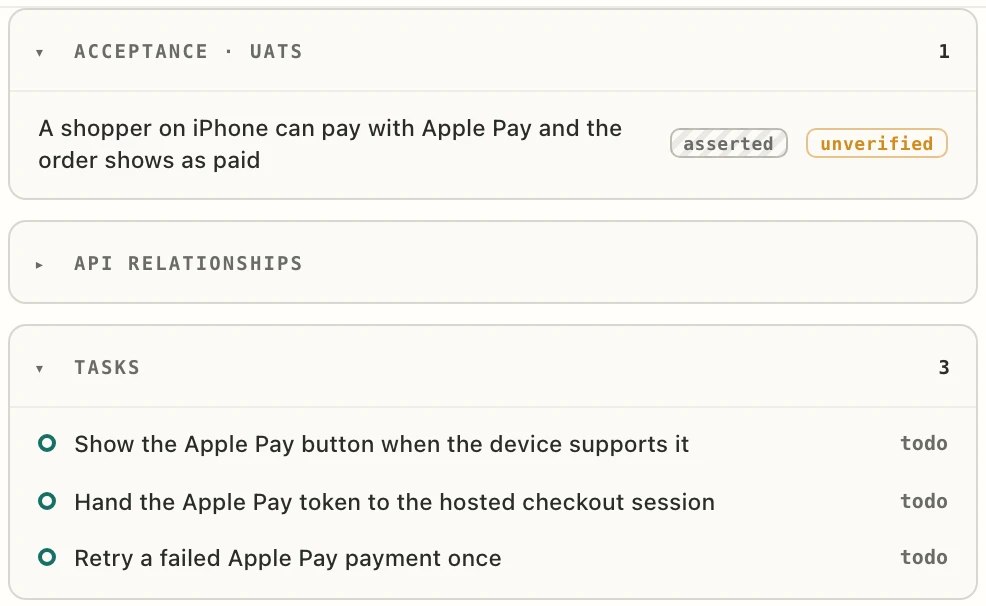
    The slice's panel sections “Acceptance · UATs”, with one criterion marked asserted and unverified, and “Tasks”, with three tasks marked todo.
    The slice's “Acceptance · UATs” and “Tasks”.
  7. The first task, finished

    your agent

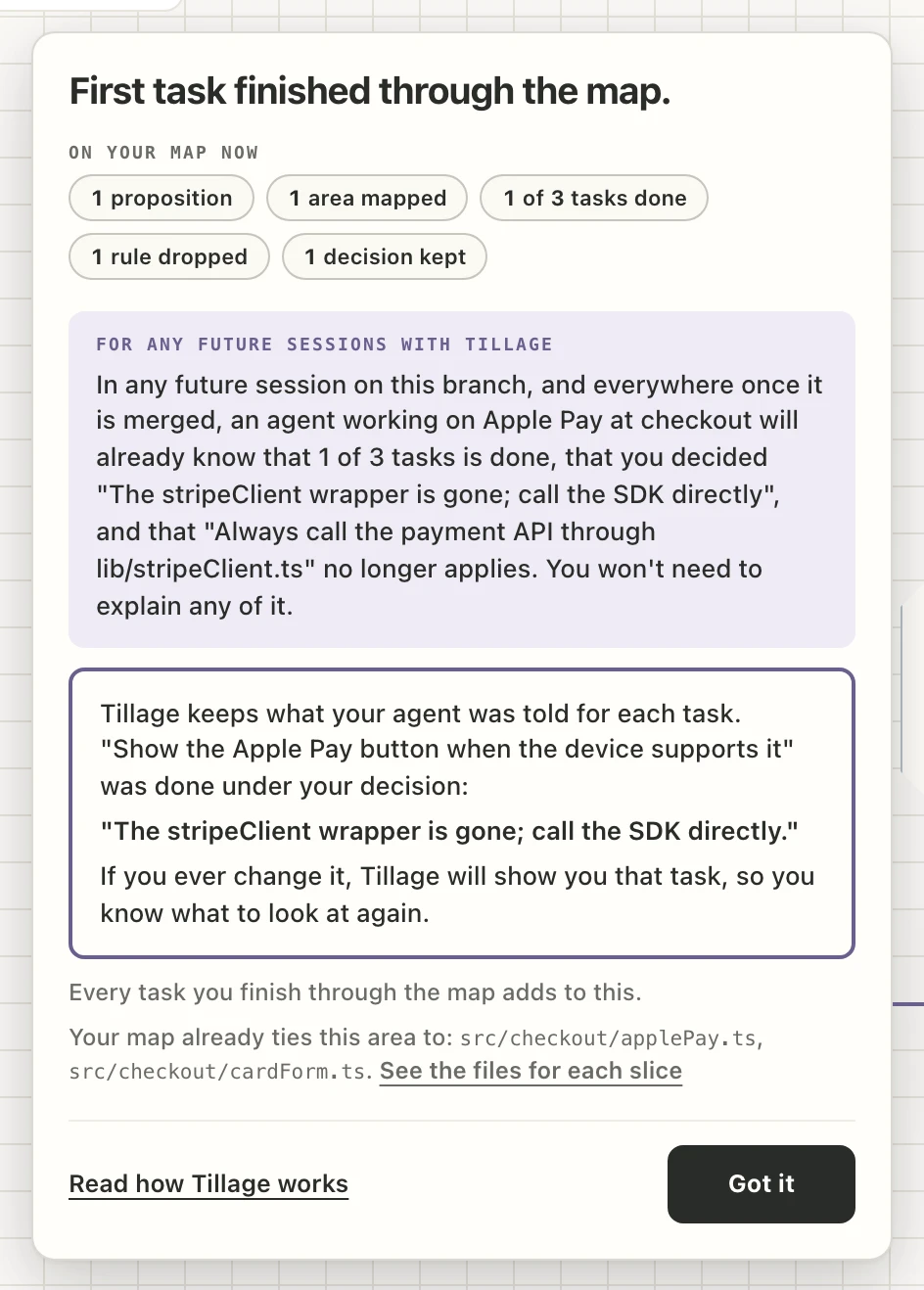
    Committed 62162ae: the Apple Pay button shows when the device supports it. The task is closed with that commit. One choice I made along the way is recorded as a proposed decision for you to keep: orders are confirmed from the webhook, not the browser.

    Your agent commits and closes the task with that commit. The panel “First task finished through the map.” opens.

    The panel “First task finished through the map.”: what is on the map now, what any future session will already know, and the decision the first task was done under.
    The closing panel.

From now on

Every new chat in this repository starts from the map: your agent is told the folder has one and reads it before working. That is how your agent is instructed, not something Tillage forces. Here is what it looks like.

06

Next steps

Eight things you will do in your first weeks, on the same example.

Opening tomorrow's session

When you come back to the repository.

Do
Open Claude Code in the repository and ask for anything.
See

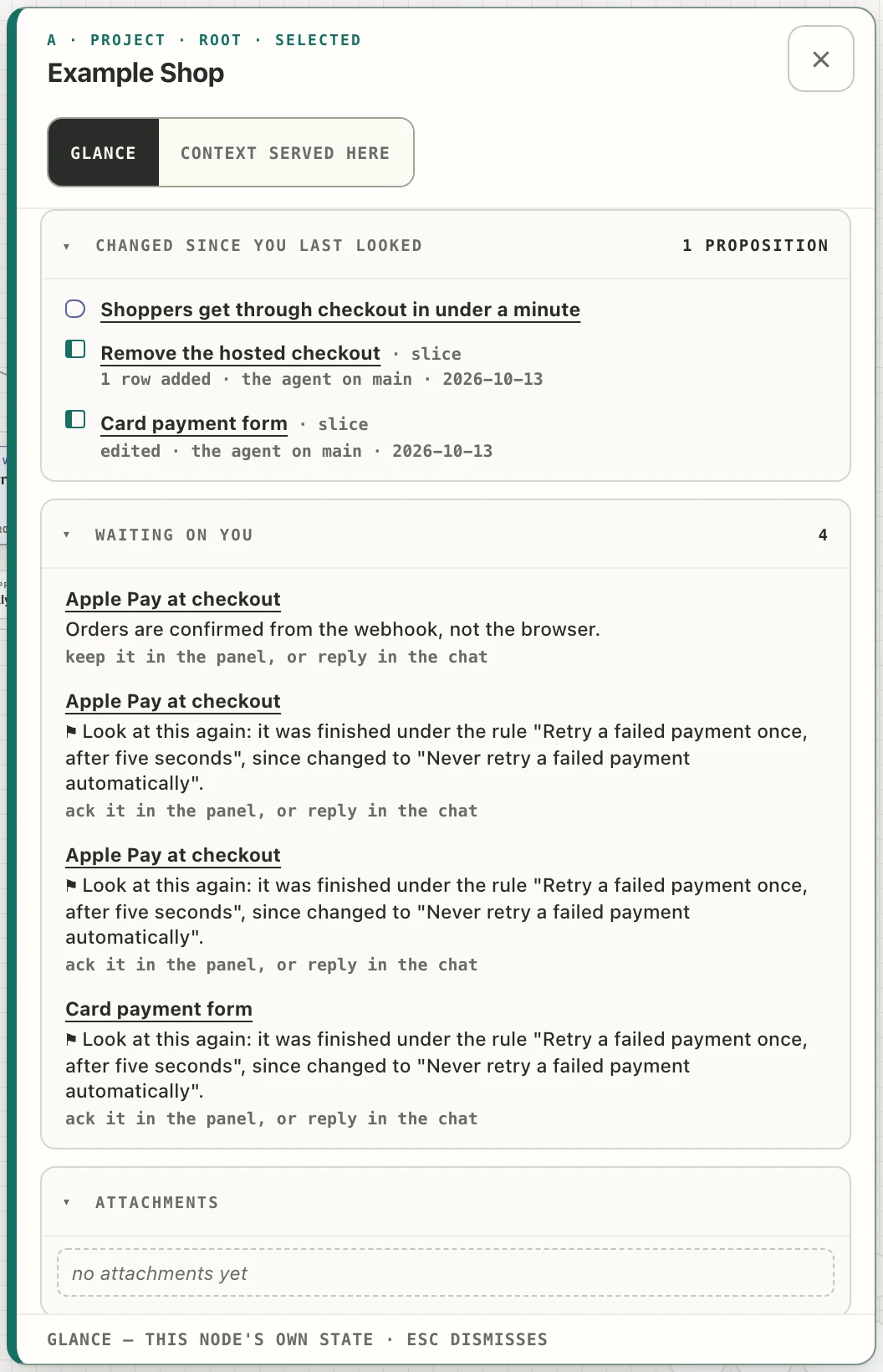
Tillage tells your agent the folder has a map. Your agent reads it before working and gives you the link: open notes first, then what changed since that area was last worked on.

On the map: a card reading “Continue — ‹task›” at the bottom left when a task is in progress (it shrinks to a dot after about six seconds), “‹N› waiting on you” beside the level you are on, and the project card's panel with “Changed since you last looked” and “Waiting on you”.

Watch out
Starting from the map is the agent's instruction; Tillage does not enforce it.
The project card's panel: “Changed since you last looked · 1 proposition” listing a proposition and two slices with what changed, and “Waiting on you · 4” listing a decision to keep and three flagged tasks.
The project card's panel: “Changed since you last looked” and “Waiting on you”.

Recording a rule or a decision

When you say how something should always be done, or settle a choice.

Do
Say it in the chat: “From now on, money amounts are whole numbers of cents.” The words “always”, “never”, “from now on”, “remember” and “we decided” prompt your agent to record it before replying.
See

It goes on the card it governs, and your agent says where: “Recorded under Billing — say if it belongs elsewhere.” On the card it is signed “confirmed by ‹name› in chat”. A nearer card wins over a higher one.

By hand: type into “add guidance…” in a card's panel. A hand entry is kept at once but carries no name, and a hand decision has no “because”.

Watch out
Recording needs git config user.name in the repository. Guidance on the project card reaches every task, so keep it short.
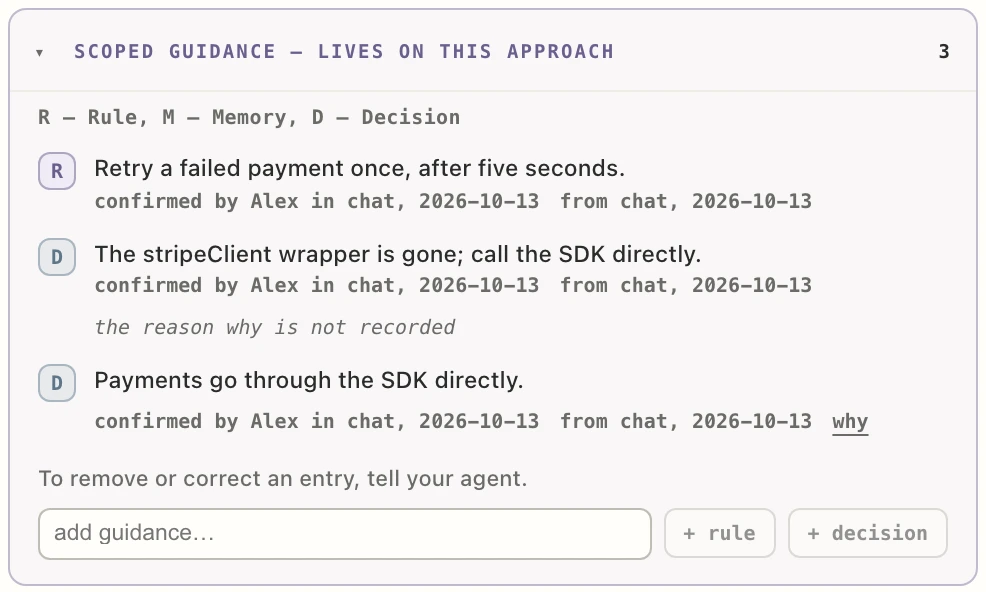
An approach's “Scoped guidance” section: a rule and two decisions, each signed “confirmed by Alex in chat, 2026-10-13”, with the “add guidance…” box below.
An approach's “Scoped guidance” with a rule and two decisions said in the chat.

Keeping what your agent proposed

When your agent made a choice along the way.

Do
Click “Keep” in the card's panel, or on the Context page (“§ Context”, or the L key), which lists every rule, decision and memory with “Keeping as ‹name›” at the top. To remove or correct an entry, tell your agent.
See
Your agent's own choices show “proposed — not yet decided”. Once kept, the entry carries your name.
Watch out
Entries you have not kept still reach agents, marked unreviewed.
The Context page with “Keeping as Alex” at the top and an unreviewed decision with its “Keep” button.
The Context page: “Keeping as Alex”, and an unreviewed decision with “Keep”.

Working on a branch and merging

When you want your agent's map changes held until you merge.

Do
Work on a branch with a commit of its own, then merge it. On main, your agent's cards and tasks count as accepted at once.
See
A card changed on the branch wears a small pill with the branch name; hovering it shows main's version beside the branch's. Rules and decisions always wait for your Keep, on any branch, unless you said them in the chat. When the branch's map changes land on main, the pills leave.
Watch out
Before its first commit, git treats a branch as main, so changes count straight away. To abandon a branch's map changes, ask your agent.
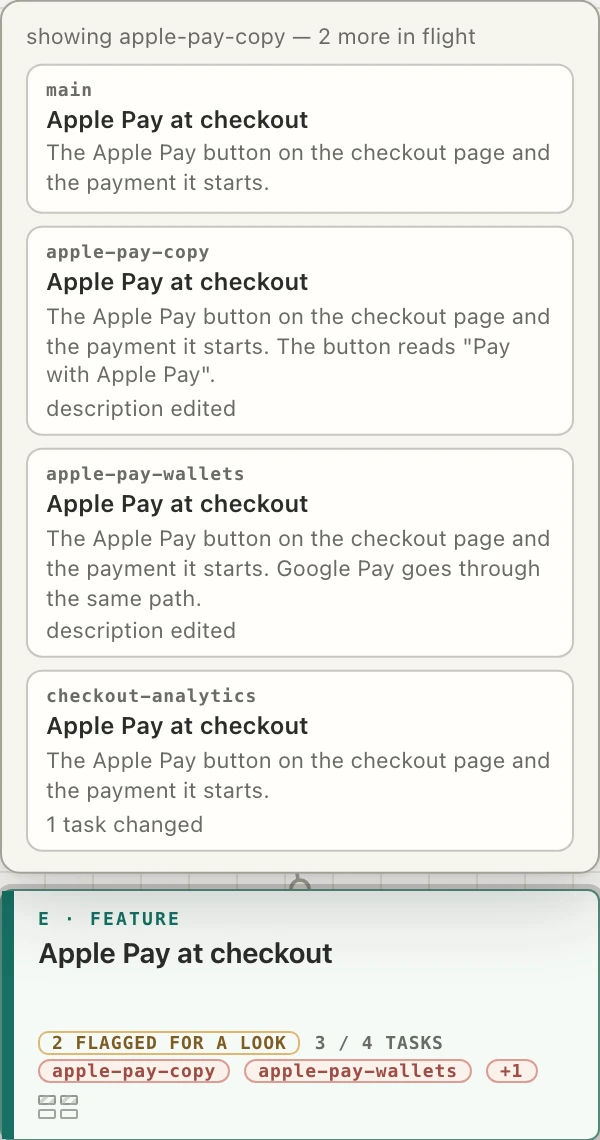
The slice card “Apple Pay at checkout” wearing two branch pills and “+1”, with the hover open above it showing main's version of the card beside each branch's.
A card with two branch pills and “+1”, the hover open.

How you merge matters

What each kind of merge keeps

How you mergeMap changes land on mainTrace from main's commit to the task
Merge commitYesYes
Fast-forwardYesYes
Squash mergeYes, if it lands as-isNo: it stops at the new commit
GitHub “Rebase and merge”Yes, if it lands as-isNo

Lands as-is means: no conflict fixed by hand, no edit made while merging, and no change on main right next to the branch's own lines.

Before you delete the branch on your machine

Check that its cards have lost their branch pills. A pill that stays means the match failed, and deleting the branch locally (git branch -D, or gh pr merge --delete-branch) then hides those changes from the map, with no way built to recover them. Keep the branch. GitHub deleting its own copy after a merge is fine: only the branches on your machine count.

Changing course

When a rule, an approach or a whole proposition turns out wrong.

Example 1

A rule changes

Do
The rule “Retry a failed payment once, after five seconds.” held while three tasks were finished. Tell your agent that failed payments must never be retried automatically; it changes the rule.
See
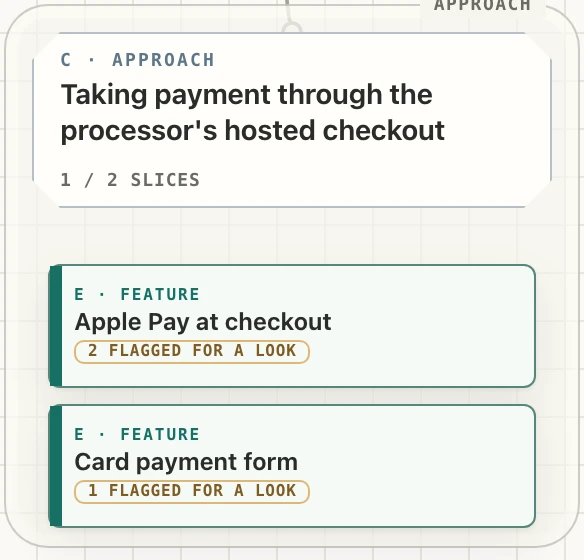
The alert reads “You changed a rule.” and “3 finished tasks were done under the old version.” Click “Flag them for a look”: each of those tasks gets a note, and the cards holding them read “2 flagged for a look” and “1 flagged for a look” until the notes are closed.
Watch out
The alert shows only while the map is open; your agent names the tasks in the chat either way. The button needs your git user name. Only finished tasks are counted.
The alert “You changed a rule. 3 finished tasks were done under the old version.” with the button “Flag them for a look”.
The alert, with “Flag them for a look”.
The approach with its two slice cards, one reading “2 flagged for a look” and the other “1 flagged for a look”.
The cards after the click.

Example 2

An approach is dropped

Do
“We're dropping the hosted checkout.” Your agent parks it. Then ask for the removal, and afterwards for the old rules to be dropped.
See

The card shows “⏸ parked”, and its panel opens on “Everything this touched”: “Goes with it” (slices and their files), “Shared, stays”, “Built on it, elsewhere”, “Rules and decisions that go with it”, and “Finished work done under those” with “Show them” and “Flag them for a look”. It ends: “Reply to your agent in the chat: remove what goes with it, and look at what's shared or built on it.”

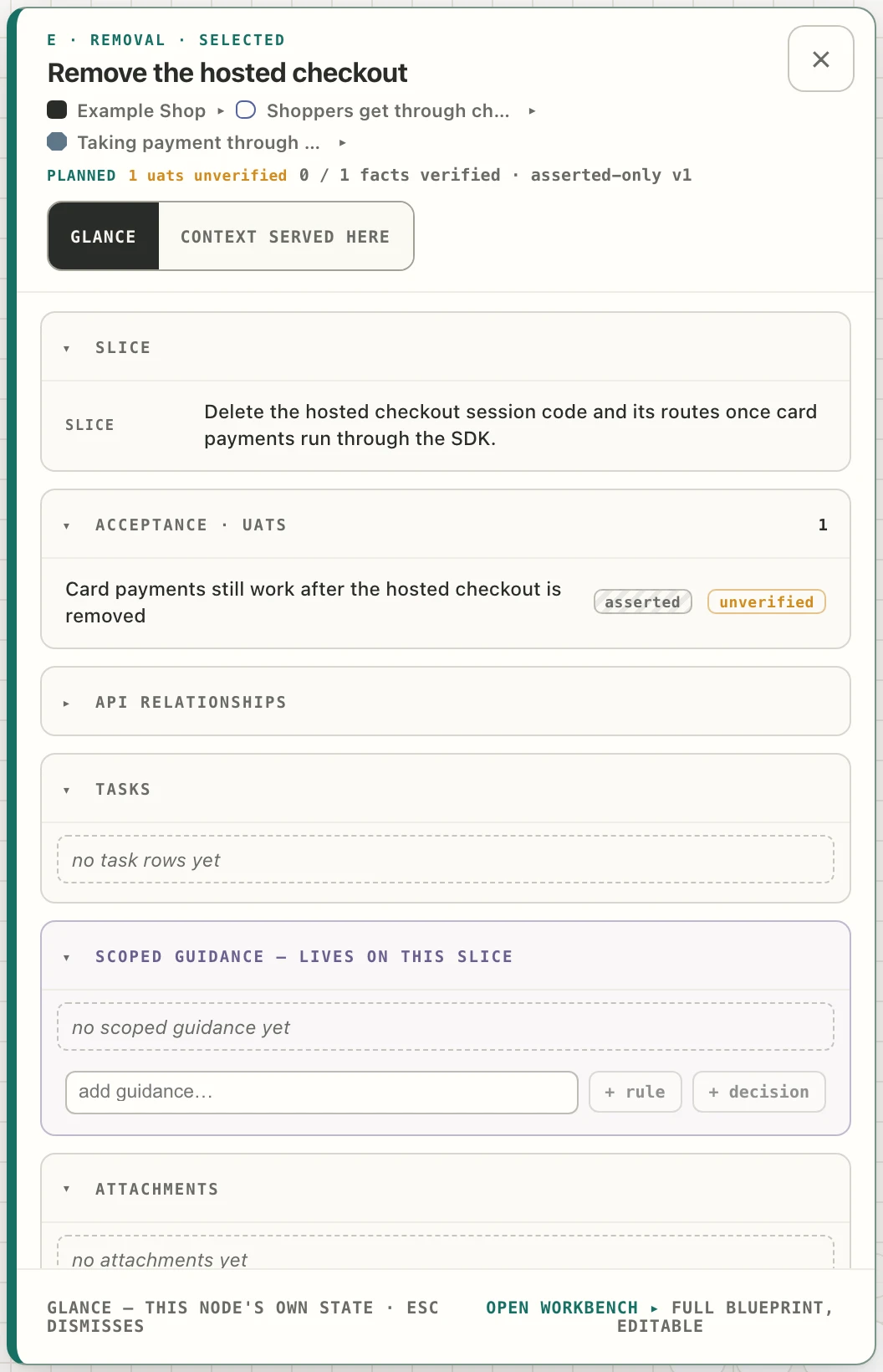
The removal becomes its own slice, of the kind “removal”, whose done-when line says card payments still work.

Watch out
Until you drop them, the parked approach's rules still reach agents, marked parked.
“Everything this touched” on the parked approach, its five groups and the closing line asking you to reply to your agent in the chat.
“Everything this touched”, all five groups.
The panel of the slice “Remove the hosted checkout”, of the kind removal, whose acceptance criterion reads “Card payments still work after the hosted checkout is removed”.
The removal slice, done when card payments still work.

Example 3

A proposition turns out wrong

Do
“Shoppers can split a payment with a friend” sees almost no use. Tell your agent it is invalidated; it records that on your word. To shelve an idea without ruling it out, use the card's “park” button instead.
See
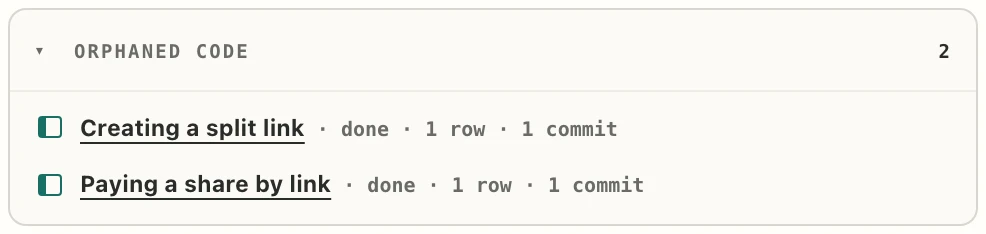
The proposition's panel lists “Orphaned code”: the slices nothing else still needs, with their task and commit counts. A parked proposition stays in its row, striped and marked “⏸ parked”, and is listed on the “Candidates” strip at the top level, where “Unpark” brings it back.
Watch out
Parking a proposition does not list its code; only an invalidated one shows “Orphaned code”.
The section “Orphaned code · 2” on the invalidated proposition: two slices, each “done · 1 row · 1 commit”.
The invalidated proposition's “Orphaned code”.
The “Candidates” strip at the top level, holding one parked proposition with its “Unpark” button.
The “Candidates” strip, with a parked proposition and “Unpark”.

Tracing a bug to the task behind it

When agent-written code misbehaves.

Do
Say “trace this bug: ‹what's wrong›”.
See
Your agent goes from git blame to the task that made the commit, reads what that task was told, and works out whether the guidance was wrong, the agent ignored it, or nothing covered the case. It leaves a note on the task and proposes a fix to the guidance.
Watch out
No screen shows what a task was told; your agent reads it for you. A task never marked in progress has no receipt. After a squash merge the trail stops at main's commit, and your agent falls back to the slice that owns the file.
The slice's full panel: its tasks, three of them “done · 1 commit”, and the “⌁ code” strip naming the file the slice owns.
The slice's full panel, with the task's commits and the “⌁ code” strip.

Where pipelines and internal tools go

When the work serves your developers, not your users.

Not under Architecture, which holds only approaches other things are built on. Pipelines, internal tools and internal docs serve developers, so they get a proposition of their own. Three examples:

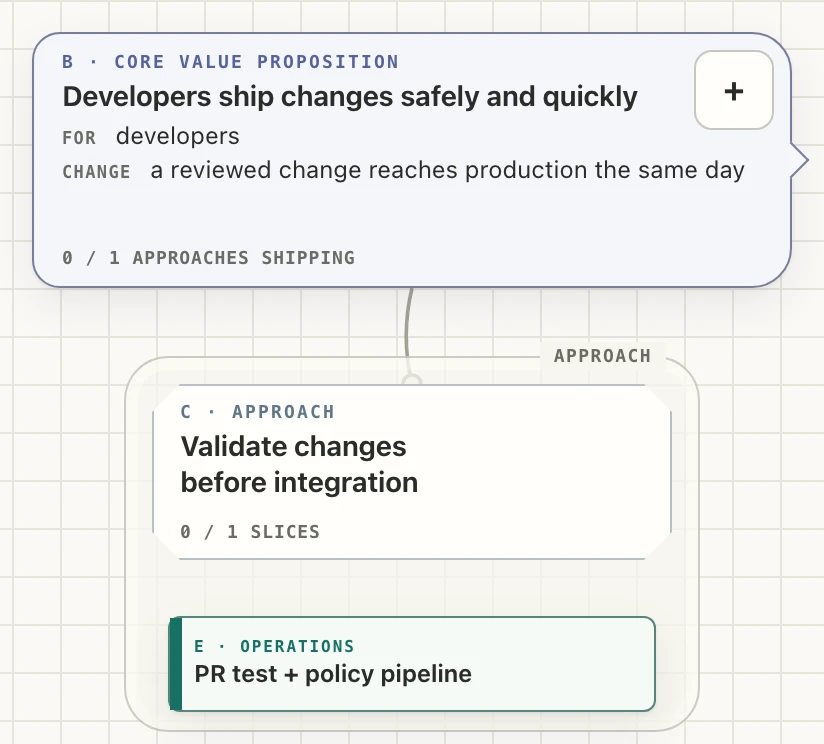
  • Developers ship changes safely and quickly
  • Validate changes before integration
  • PR test + policy pipeline
  • Release with controlled risk
  • Progressive deployment + rollback
  • Diagnose production failures
  • Request-correlated logs and traces

Internal docs the same way: “New engineers ship a change in their first week”, with an onboarding-doc slice under it. Machinery you maintain (pipelines, monitoring, backups) is the slice kind “operations”.

The developer chain on the map: the proposition “Developers ship changes safely and quickly”, the approach “Validate changes before integration” under it, and the slice “PR test + policy pipeline” of the kind operations.
The developer chain: proposition, approach, and an “operations” slice.

Warnings on the project card

When the map's own shape needs a look.

See
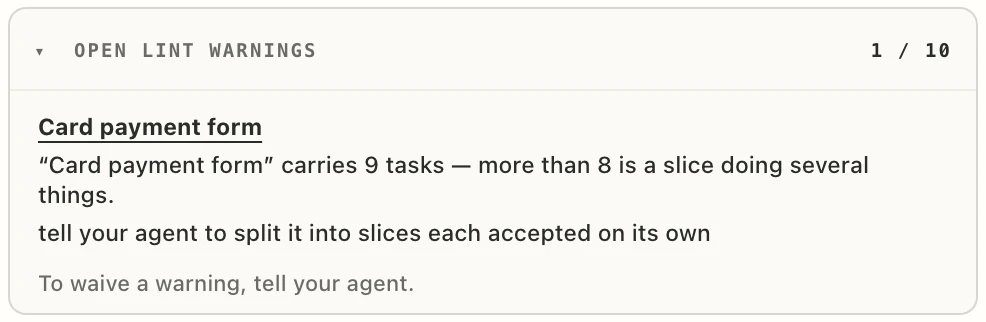
The project card's panel lists “Open Lint Warnings ‹n› / 10”: problems with the map's own shape, such as a slice holding too many tasks, each saying what to do (“tell your agent to split it into slices each accepted on its own”).
Do
Fix it, or tell your agent to waive it with a reason. A waived warning then reads “waived by ‹name› · ‹date› · ‹reason›”.
The section “Open Lint Warnings 1 / 10” on the project card's panel: the slice “Card payment form” carries 9 tasks, with the line “tell your agent to split it into slices each accepted on its own”.
“Open Lint Warnings” on the project card's panel.

07

What runs on your machine

  • Your map stays localIt lives in ~/.tillage and is served at a localhost address. The plugin makes no network calls. What the map gave your agent and what came back is recorded there too, and nothing leaves your machine.
  • Ten hooksEach adds one line of fact for your agent. None blocks an edit; one can hold a reply open, when files changed and nothing was recorded on the map.
  • Your prompts stay putYour prompt text is scanned on your machine for a few fixed words. Nothing is stored or sent.
  • One switchDisabling the plugin turns all of it off.
The full hooks table, in the README ↗

08

Important notes

  • Individual version is Local OnlyYour map lives on your machine, in ~/.tillage, and is not shared with anyone.
  • Squash mergesA squash merge, or GitHub's “Rebase and merge”, lands your map changes when it lands as-is, but always loses the trail from main's commit to the task. How each kind of merge behaves.
Every known issue, in the README ↗